
How to add brand context to your AI product
Follow a generation job from the customer’s task and authorized brand through guidance, assets, rendering and review. Keep future jobs current with saved brand versions and applied corrections.
TL;DR
Describe the whole generation job and resolve the customer's permitted brand on your server. Give each step the context it can use: writing guidance, visual references, or exact values and files. Keep those inputs on the same brand version, check the finished work, and refresh saved context when the brand changes.
Describe the whole job
A request for a launch email can involve copy, a generated image, a template and a final check. Each step needs usable brand inputs: writing guidance, visual references or exact files and values.
Record the complete job, including decisions your application already knows:
Brand selected for this customer:
Audience and purpose:
Subject, preheader and body sections required:
Hero image dimensions and whether it contains text:
Exact headline and call to action:
What the template places itself: logo, text, buttons
Product facts and current sources:
Keep this task with the job. Tell the image step which elements the template will place itself.
Connect the job to a maintained brand
A public lookup can prefill company information. Brandfetch's on-brand AI guide shows server retrieval and domain caching; its Brand Context API returns prose, with logo files, colour values and font names supplied separately by its Brand API. Private guidance and customer corrections need their own sources.
Rainbrand builds and maintains that context across jobs:
- Create an account and follow the API quickstart.
- Add the brand from sources such as the customer's website, Instagram account or guide. Include original files and instructions, and store the returned Brand ID against that customer.
- Wait until ready, then read its profile: palette, gradients, typography roles and logos. You can show these for customer inspection.
Brand creation, Briefs and Reviews use account credits. Customers already using Rainbrand can connect their own account through OAuth.
Resolve customer access on your server
A shared API key can reach the brands held in its Rainbrand account. Your server must resolve which brand the signed-in customer may use before every request; never trust an unchecked ID from a browser or model.
For a customer-facing agent, expose a tool that accepts the task while your server supplies the authorised Brand ID. Stop when that mapping is missing. MCP and the API reach the same brands, but a direct MCP connection using the shared key can list and use them; wrap the needed API calls instead.
The customer-brand guide covers lifecycle and isolation tests.
Retrieve and route the context
Retrieve the profile's exact renderer values and request a Brief for the whole job. A Brief selects the task's guidance and files; describe what the template handles in the request. Wait for completion, then route its contents:
| Step | Context to supply | How the step uses it |
|---|---|---|
| Writing | Task, voice rules, terms, claims and examples | Write the subject, preheader and body. |
| Image generation | Task, guidance, reference images and font specimens | Generate imagery with concrete visual references. |
| Layout and rendering | Profile values, font files and logo files | Set exact colours and type, and place the original logo. |
| Review | Finished work, expected wording and the relevant brand | Check what was actually produced. |
The complete runtime example obtains the Brief. Stop on retrieval failure instead of generating without context.
Compare the profile's activeSkill.id with the Brief's skillId before routing. If they differ, request fresh context; a null skillId means its saved version was deleted. The following runs after authorization; getBrand and themeFor are application helpers, not Rainbrand SDK functions:
const { guidance, assets, skillId } = brief.data;
const currentBrand = await getBrand(brandId);

if (!skillId || currentBrand.activeSkill?.id !== skillId) {
  throw new Error("Request a new Brief with an available, matching version");
}

const copyStep = { task, guidance };

const imageStep = {
  task,
  guidance,
  references: assets.filter(
    (asset) => asset.kind === "image" || asset.kind === "font_render"
  ),
};

const renderStep = {
  theme: await themeFor(currentBrand, skillId),
  fonts: assets.filter((asset) => asset.kind === "font"),
  logos: assets.filter((asset) => asset.kind === "logo"),
};

// Cache the theme by version and save skillId with the output.
- Profile logo links are temporary: store files by their SHA-256 hash, not by URL.
- Brief asset links have no scheduled expiry: they depend on the Brief, brand, version and asset remaining available. Anyone holding a link can open it.
Pass the context to your generation tools. For supported image/video models, the AI Gateway can add Brief guidance and visual assets when you pass its ID. Your product supplies the task and controls creation.
Put exact elements in the renderer
Let the email template place original logos and typeset text; generate the hero imagery separately. OpenAI documents consistency and composition limits, while Gemini supports multiple references with model-specific limits. Check any generated text afterwards.
The Zalando email concept combines a generated street-style scene with the fashion retailer's original wordmarks and live text, using its “Inner Voices” campaign premise:
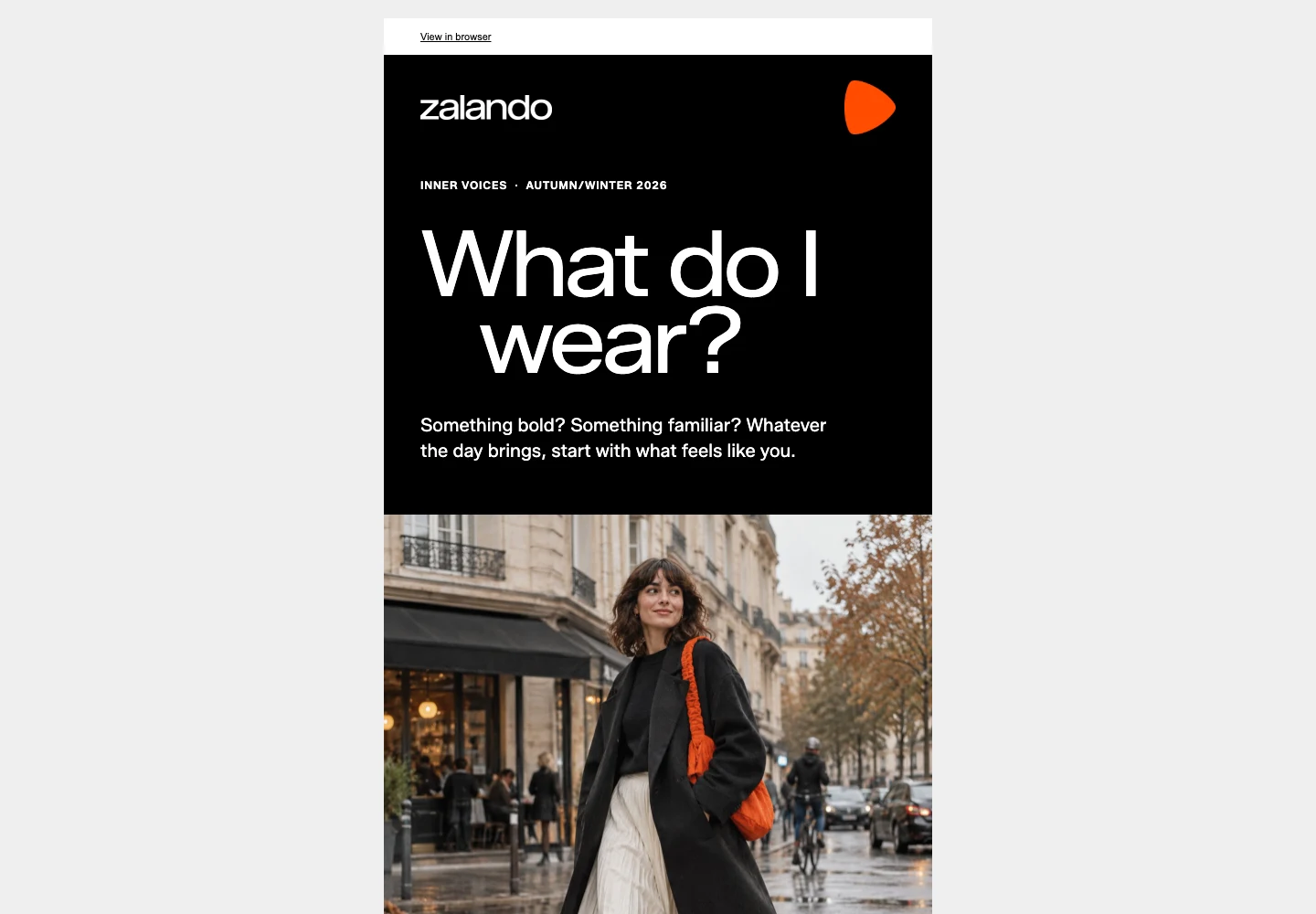
The HTML places the wordmark and text; the generated image supplies the scene
Its downloadable HTML loads the bundled Zalando Sans file and provides Arial and Helvetica fallbacks:
@font-face {
  font-family: "Zalando Sans";
  src: url("/examples/zalando-inner-voices-email/zalando-sans-variable.woff2")
    format("woff2");
  font-weight: 200 900;
}
The email walkthrough explains how the guidance, HTML and preview fit together.
For existing Canva brand templates, the Autofill API provides another way to fill a preserved layout.
Review the finished work
Check the assembled email, including template-produced elements:
- Use application checks for names, required copy, button destinations and theme values.
- Request a Rainbrand Review of a rendered screenshot, with expected wording. It returns brand findings with reasons and available evidence; your tools make corrections.
- Keep findings with the exact capture. Check remaining sections and layouts separately.
Define the response to each verdict before automating revisions:
| Verdict | Suggested handling |
|---|---|
pass | Continue without revising that check. |
fail | Revise using the reason and review again, within the job's retry limit. |
uncertain | Inspect the evidence or supply clearer references; keep unresolved findings visible. |
not_applicable | Skip the check because the work has no relevant element. |
Set a retry limit; the Review guide illustrates two editing rounds. Stop on operation failure, and decide whether unresolved work is returned or held for inspection. Save the Brief, brand version and Review references with the output.
Refresh context for the next job
If the saved guidance is wrong, prepare and inspect a Brand Edit, then apply it. Request a new Brief and refresh cached themes, files and task context. Completed Briefs and your stored copies do not update themselves.
At the October 2026 source review, the API documented no change notifications. Read the current profile at job start and use the version check above. Preserve original inputs for completed work; the versioning guide explains that history.
Before release, verify one complete job: wrong-customer access is rejected, missing context stops creation, and an applied change reaches the next job. Continue with the integration guide.
More in Developers
All 5 Developers articles8 min read
Best brand APIs for AI agents
Brand APIs return different things. Lookups describe any company’s public identity, platform APIs read the files a customer already stores, and a maintained brand returns guidance and files for each task. Compare what each returns, who keeps it current, how access works and how pricing differs.
6 min read
How do agents retrieve brand context at runtime?
Retrieve task-specific brand guidance and files, pass them to the tools making the work, and record the version used. Implement deliberate reuse and a visible failure path.
6 min read
How to manage your customers’ brands in an AI product
Tie each customer to the right brand on your server, then handle creation, corrections, versions and deletion without exposing another customer's guidance or files.
