How to review AI content before it’s published
Check finished AI work against the brand, understand Review verdicts and evidence, make corrections, and keep facts, rights and accessibility in view.
TL;DR
Check the finished work against the brand guidance and the task it was made for. Turn each finding into a specific correction, clearer reference or unresolved decision, then recheck the revised output. Brand findings cover the checks performed; facts, rights, accessibility and publication requirements still need their own evidence.
Start with the work that will appear
Review the finished file in its intended placement: a correct draft can lose its font when rendered or use the wrong product name in an image. Keep the task, expected copy, required assets and brand guidance beside it. Campaign instructions apply to that work; they do not automatically change standing brand rules.
Compare specific elements with specific rules
Name the element, the rule it differs from and the correction:
| Area | What to compare | Useful finding |
|---|---|---|
| Copy | Product names, required wording, voice rules and qualifiers | The product name drops the word “Pro”; restore its full spelling. |
| Colour | Each colour’s intended role, including campaign exceptions | The headline uses a product accent reserved for packaging. |
| Typography | Font family, weight and hierarchy | The export substituted the body font for the display font. |
| Logo | Original artwork, variant, proportions, clear space and placement | The white wordmark loses contrast on this background; use the permitted dark variant. |
| Product and imagery | Supplied screenshots, photographs and reference roles | The illustration shows a control absent from the approved product screenshot. |
Spelling can be compared directly; composition needs interpretation. If no rule or reference supports a finding, clarify the guidance. The voice-guide tutorial covers writing rules; keep original visual assets accessible too.
Request a brand Review
Rainbrand maintains context that agents use to make and check brand work. Its Review returns findings with reasons and available evidence pictures.
- Supply a finished image or render a page, email or slide as a clear screenshot. Upload it if the agent cannot access the file.
- Include expected wording for copy checks.
- Select colour, typography, logo and copy as needed. The request takes one primary image; check required slides separately.
Review the attached finished composition against [brand]. Check colour, typography, logo and copy. Use the expected wording attached to this request. Wait for the Review, then show each verdict, its reason and any evidence pictures. Identify anything the supplied image or references did not let you check.Check links, keyboard use and email-client rendering separately; a screenshot does not establish those behaviours.
Read the finding before acting on the verdict
Read each verdict with its reason and evidence:
| Verdict | What it means for this check | Next action |
|---|---|---|
pass | No revision was identified as necessary. | Keep the result with the file that was checked. |
fail | The finding identifies a mismatch with the brand. | Inspect it, make the relevant correction and review the revised work. |
uncertain | The available evidence did not support a firm judgment. | Inspect the element or supply a clearer capture or reference. |
not_applicable | The image has no relevant element for that check. | Skip it, or investigate if you expected that element to be present. |
For uncertain typography, inspect the source font before generating again. Investigate a not-applicable logo result if the task required one. An operation failure is not a verdict; a pass covers only the submitted input, references and requested checks.
Keep the evidence’s scope visible
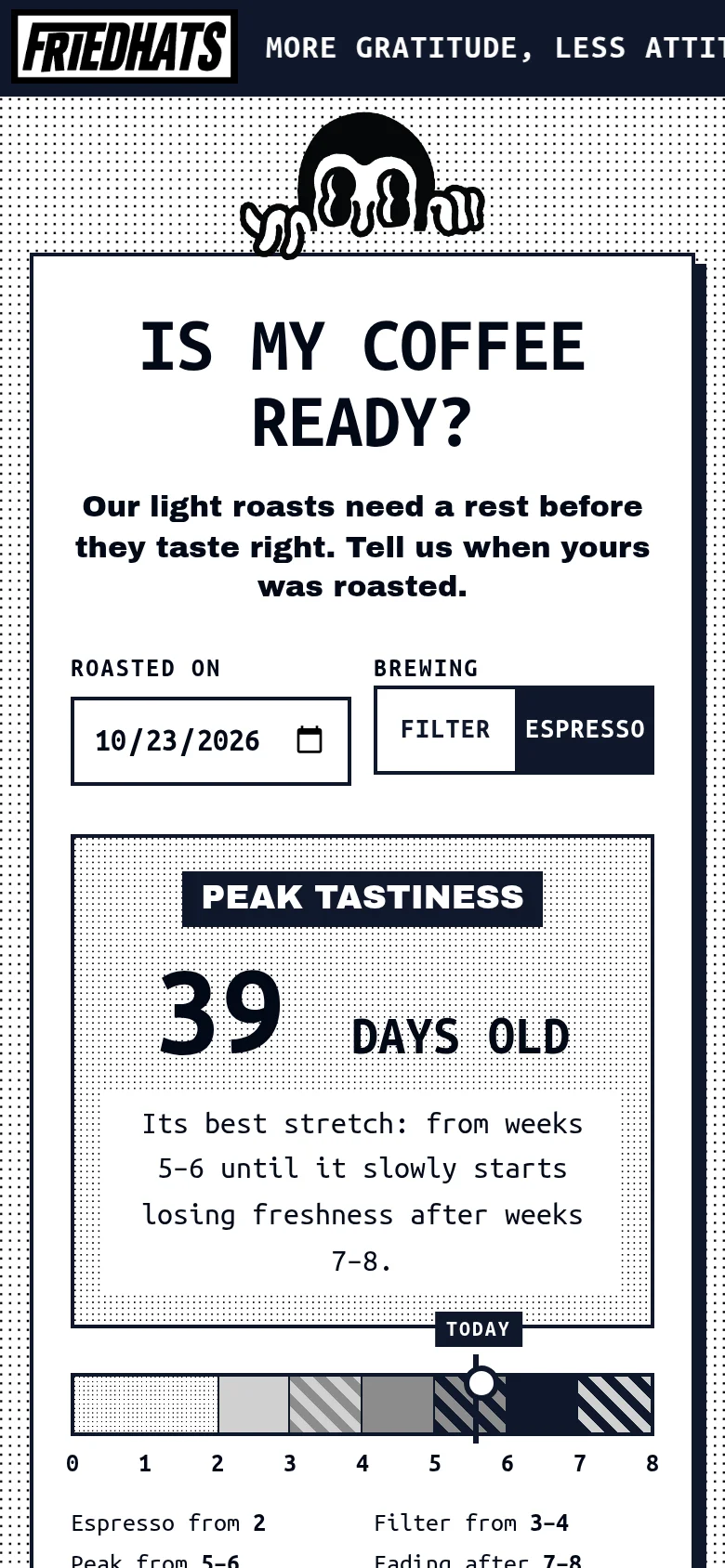
For coffee roaster Friedhats, Claude made a phone page showing when to brew a delivered jar. Its first espresso-screen capture clipped the header motto and used Ubuntu Mono where the body guidance called for Archivo Black:
Claude made the motto a static line that fit and changed the body font:
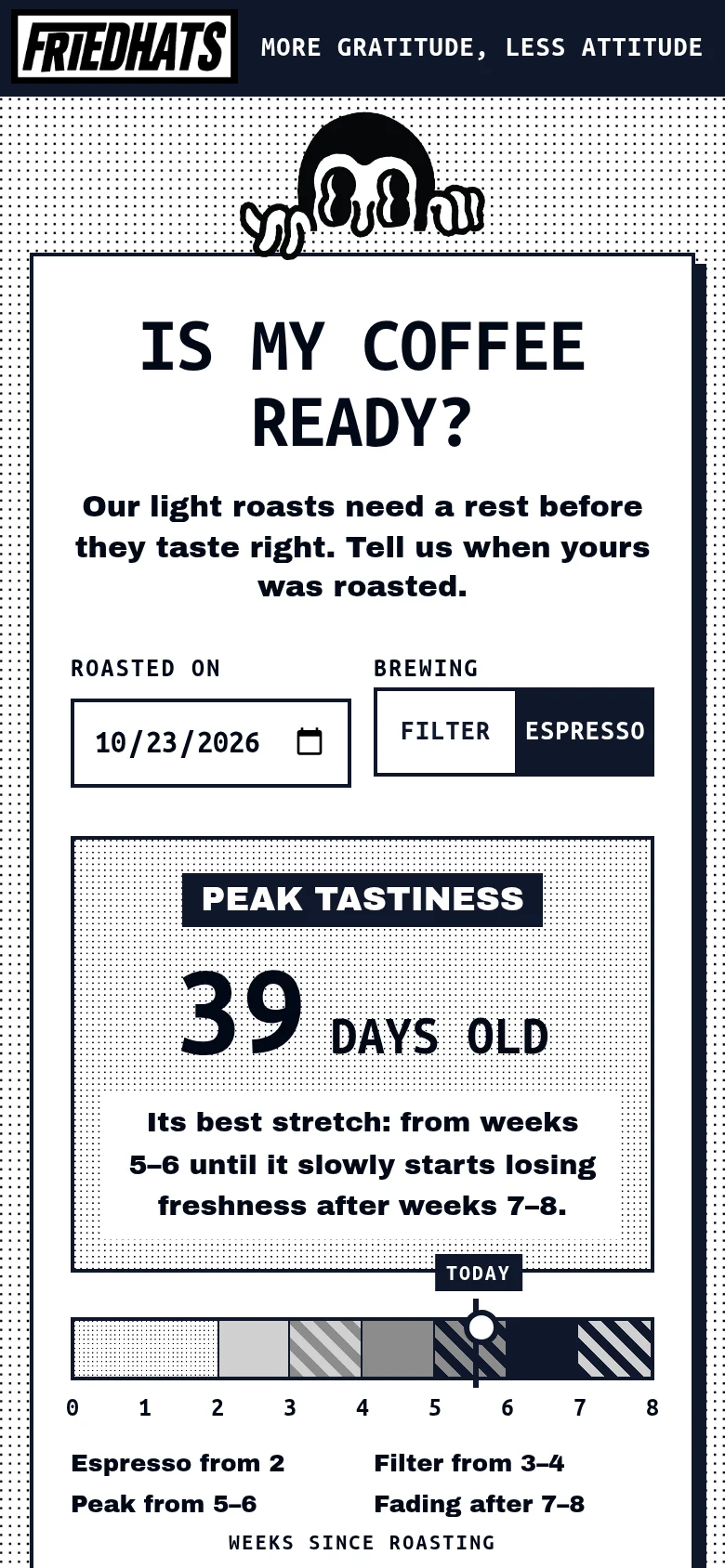
The revised capture passed the four requested checks. The full Friedhats example keeps these matching captures and findings together.
Revise the work and review the result
Have your agent correct the editable source with its own tools, then check the revised output. Set a bounded loop:
Use the Review findings to revise this composition with your editing tools, then request another Review. Make up to two editing rounds. Stop when the applicable checks pass, an operation fails or a finding needs a decision you cannot resolve from the task and brand guidance. Show the final file, the changes and anything still open.Two rounds is an example, not a product requirement. Choose a retry limit that fits the work and cost, and stop for missing files or unresolved facts. Inspect the whole revised composition: a line-break fix can crowd the logo.
Before recurring work, request a Brief, the guidance and assets selected for the task. Keep it with the output and this review record:
Finished file or rendering:
Intended placement and task:
Brand and guidance used:
Checks performed:
Findings and evidence:
Corrections and revised file:
Unresolved decisions:
Other publication checks, where relevant:
Keep any required approval with that same version; a brand verdict grants no publication authority. For recurring findings, correct the cause: guidance, missing files or production. If guidance needs changing, inspect and apply a brand edit, then request a fresh Brief.
Check what the brand review cannot establish
Keep these checks alongside brand findings:
Facts and claims. Ask the drafting agent for an evidence list, then open the sources:
List every factual claim in this finished draft, including features, numbers, prices, dates, comparisons and quotations. For each, identify the source and quote the supporting passage from the supplied material. Mark unsupported claims explicitly. Do not rewrite the draft.Verify each quoted passage, following Anthropic's auditable-claims guidance. For advertising, FTC guidance calls for evidence of express and implied claims. Regulated or unfamiliar claims may need appropriate specialist review.
Rights and disclosures. Check permissions for the intended use of photos, fonts, logos and quotations, plus applicable channel/content disclosures.
Accessibility. Check the actual placement, including these common issues:
- Give informative images text alternatives that serve their purpose. Use the W3C’s alt decision tree to distinguish informative, functional and decorative images.
- Check text contrast, generally at least 4.5:1 for normal text and 3:1 for large text.
- Use real text instead of images of text where the technology can achieve the presentation, subject to the criterion’s exceptions.
- For video carrying prerecorded audio, check captions, including meaningful sounds as well as speech.
WebAIM’s Contrast Checker measures colour pairs, WAVE helps identify web accessibility issues, and Vale can apply written style rules to prose.
For the next piece, keep the output, task, brand reference and findings together. Give unresolved items a next action and retain any required publication decision.
More in Review
All 5 Review articles4 min read
What is brand compliance, and how do you check AI-made work?
Check AI-made work against your brand’s rules. Write rules reviewers can apply, divide automated checks from human judgment, and track what keeps failing.
4 min read
How to make brand governance work for AI agents
Brand governance was built for people who read the guide and ask before they guess. Agents only know what each run gives them. How to turn a governance policy into owners, one approved source, rules, controls and approvals that agents meet while they work.
4 min read
How to check AI images against your brand guidelines
An AI image can look right and still carry a redrawn logo, a near-miss colour or a misspelt headline. What to check, how to turn each guideline into a pass or fail, and where software can do the checking.
