Bloom is now Rainbrand

(Brand guidelines) // Productivity software

Notion brand
guidelines

Notion’s logo, colors, fonts, voice, and dos and don’ts, from the Brand Skill Rainbrand built from notion.com.

Download the Brand Skill

About Notion

Notion is an AI-powered workspace where teams bring knowledge, documents, projects, and connected tools together. Its identity pairs a clear, flexible workspace with AI that works in context, helping teams capture knowledge, find answers, and automate work.

Use Notion’s wordmark or standalone N mark as the brand identity. Keep the artwork intact and legible; choose the wordmark when the brand name needs to be explicit and the standalone mark when the context already identifies Notion.

Notion colors

  • Black

    Logo, text and primary color

    HEX
    RGB
  • White

    Backgrounds

    HEX
    RGB
  • Gray

    Warm neutral surfaces

    HEX
    RGB
  • Blue

    Core accent

    HEX
    RGB
  • Red

    Core accent

    HEX
    RGB
  • Yellow

    Core accent

    HEX
    RGB
  • Action blue

    Primary buttons and links on notion.com

    HEX
    RGB

Notion fonts

  • NotionInter

    Headings · 600, Body · 400

Font names only. The Brand Skill download doesn’t include font files.

Notion’s voice

Write with clarity, warmth, confidence, and a practical bias toward what people can do. Keep sentences conversational and concise; use everyday language and contractions. Explain complex product capabilities in concrete terms, connect features to useful outcomes, and let an occasional playful phrase add energy without making the message feel gimmicky.

Favor clear benefits and specific actions over abstract hype. Use short headings, then explain the outcome in plain language; for example, describe how agents use team context to complete tasks or how search finds answers across connected apps.

  • “Where teams and agents Think together”
  • “Bring everything into one system of record”
  • “Keep work moving 24/7 with agents”
  • “One word to describe Custom agents: crazy...crazy good”
  • “The tools are ready. How will you decide to build your future?”

Dos and don’ts

Do

  • Use Notion’s wordmark or standalone N mark as the identity, and keep the artwork clear and intact.
  • Build visual hierarchy with black, white and warm grays; reserve blue emphasis for actions or focused elements.
  • Use NotionInter for headings, body copy, and interface text.
  • Write in a clear, warm, practical voice. Explain what a feature helps people accomplish.
  • Show the product in context when illustrating how teams capture knowledge, find answers, or automate work.

Don’t

  • Don’t substitute partner or customer marks for Notion’s own identity artwork.
  • Don’t make broad AI privacy, security, compliance, or plan-availability claims without keeping the stated qualifications.
  • Don’t rely on vague hype when a concrete benefit or example can explain the work.

Notion imagery

142 images from notion.com, in 2 files of the Brand Skill. Each file starts with its guidance, then shows the images it refers to.

Product experience

119 images

When showing Notion, preserve its recognizable interface and convey a clear, useful workflow. Screenshots should remain legible and should show the relevant product context rather than being treated as generic decoration.

  • A clean screenshot of a digital product interface titled 'Meetings' with a blue microphone icon.
  • A minimalist screenshot snippet of a digital interface against a plain white background.
  • A dynamic collage of white software dashboard tiles features a green progress ring with the number '12', a bar chart with yellow, blue, green, and red…
  • A screenshot of a software interface titled 'Coding Agent' showcases a conversational task management workflow.
  • A clean screenshot of a project management dashboard titled "Engineering Tasks" featuring a board view with columns for "New" and "In progress." Individual…
  • A simple black and white line drawing depicts a rounded mailbox with two small black dots centered on its side like eyes.
  • A minimalist black and white line-drawing graphic depicts a character that resembles an irregular, chunky white hexagon.
  • A minimalist black ink doodle of a wooden directional sign pointing to the right.
  • A minimalist black and white line drawing of an apple features two solid black dots in the center resembling eyes.
  • A minimalist black line drawing of a lightbulb with a cheerful smiley face inside.
  • A square computer processor icon with three pins on each side, rendered in a dark blue, minimalist flat graphic style.
  • A line graph titled 'Quality versus cost' compares AI model quality scores against average credits per task.
  • A clean screenshot of the Notion MCP interface on a light gray background, displaying integration options for AI tools.
  • A man with dark hair, glasses, and a blue button-up shirt sits centered against a terracotta-colored, vertically ribbed wall.
  • A glassmorphic application dock floats centrally against a painterly, abstract background of blurred green, red, and yellow brushstrokes.
  • A clean software interface screenshot for Notion MCP featuring a card titled "One brain for your agents" above a list of integration options.
  • Three hand-drawn, circular characters with minimalist facial expressions occupy the left side of a clean white landscape.
  • A split-screen graphic on a warm yellow background features the GitHub Octocat logo between a Notion page and multiple overlapping interface windows.
  • A close-up UI screenshot of a software product's version history panel titled 'PRD: Quick Add'.
  • A dark, rounded interface overlay titled 'Connect ChatGPT and Notion' features the OpenAI and Notion logos side-by-side above a toggle switch.
  • A clean software screenshot shows a 'Product Roadmap' table with projects like 'Core Agent' and 'Offline Mode.' A black cursor interacts with a property…
  • A clean graphic screenshot showing a Notion interface titled 'Database sync' on a light blue background.
  • A close-up UI screenshot displays a vertical model selection dropdown menu against a soft peach background.
  • A software feature graphic set against a clean white background, headlined by "What’s New 3.7" and "Teach every agent how your team works" in bold black…
  • A close-up screenshot of a digital product library interface with a clean, minimalist design against a soft yellow background.
  • A minimalist graphic illustration features a stylized, hand-drawn character peeking over a long, white search bar against a solid light blue background.
  • A clean software interface screenshot showcases a 'Monthly Business Review Pack Skill' page with two overlapping dropdown menus.
  • A clean graphic interface illustrates an AI assistant's workflow on a light gray background.
  • Five whimsical, hand-drawn icons with dot eyes are arranged in a horizontal row on a dark background, including an apple, a checklist, a central profile…
  • A clean UI screenshot of a 'Tools & Access' menu for managing AI agents.
  • A close-up UI screenshot of an AI model selection dropdown menu hovering over a white chat input bar.
  • A software interface screenshot for Notion AI shows a Model controls settings page with two overlapping dropdown menus.
  • A close-up UI screenshot features an AI prompt box overlaid on a document about 'Rebuilding Notion'.
  • A clean screenshot of a software dashboard's 'Developer tools' interface, featuring a light mode aesthetic with a sidebar and a main content table.
  • A close-up software screenshot shows a black cursor hovering over a copy icon next to a long alphanumeric User ID.
  • A screenshot of an AI model selection menu floating over a pastoral landscape painting.
  • A software screenshot displays a 'Feature Requests' table with a sharing modal overlaid.
  • A screenshot of a software settings interface for 'CRM Enricher' features a configuration panel for triggers.
  • A screenshot of a software 'Preferences' menu with a clean white background and black text.
  • A screenshot of a Notion workspace for 'Acme Inc.' features a large, stylized ukiyo-e woodblock print of a red mountain as the header banner.
  • A clean software interface screenshot shows search results for "Dashboard Redesign" categorized by platforms like Notion, Slack, Google Drive, and Gmail.
  • A minimalist graphic features a white circular avatar with a hand-drawn black face peering toward a stack of six rounded light-gray buttons.
  • A digital graphic shows a rounded white search or prompt box containing the text "Write me a weekly update in the style of Weekly Syncs" with a cursor and a…
  • A clean software interface screenshot displays a company profile for "Acme Inc." under an "Enterprise plan," featuring a green globe icon.
  • A digital interface screenshot depicts a 'Stand-up @Today' agenda with a red speech bubble icon at the top.
  • A split-screen software screenshot features a navigation sidebar on the left and a task page on the right.
  • A clean screenshot of a project management dashboard titled "Projects" under a blue target icon.
  • A screenshot of a software interface for a digital workspace titled "Product Home" under the Acme Inc.
  • A collection of 13 software integration icons arranged in a large circle around a central, minimalist line-art face.
  • A minimalist, hand-drawn graphic features three circular icons layered together with thick black outlines.
  • A digital interface mockup titled 'Environment Ask Info' features an automated chat window overlaid on a spreadsheet-style database.
  • A horizontal trio of overlapping vibrant circles features whimsical, hand-drawn icons with personified eyes.
  • A minimalist, hand-drawn line illustration of a circular face wearing a bright yellow construction hard hat, positioned in the lower right corner of a white…
  • A minimalist, hand-drawn circular character face is positioned on the right side of a wide white frame.
  • A minimalist line-art illustration of a face wearing a customer support headset is positioned on the right side of a wide white frame.
  • A minimalist, hand-drawn graphic features three black outlined hands interacting with a segmented bright blue oval.
  • A blue area chart with sharp, jagged peaks tracked against a y-axis ranging from 8 to 32, shown behind two clean white cards.
  • A software interface screenshot displays a list of app permissions for Notion, Slack, Figma, and Github.
  • A white digital interface dropdown menu displays a list of AI model options including "Claude Sonnet 4.5," "Gemini 3 Pro," and "GPT-5.2," each tagged with a…
  • A close-up UI screenshot of a software permissions menu featuring a prominent white pop-up window with a checkmark next to "All workspace members." Below…
  • A playful horizontal line of four circular, hand-drawn characters features a globe on a blue background, a head with a red chili pepper hat, a speech bubble…
  • A screenshot of a software dashboard titled Support Tickets features a white headset icon and a dark-mode interface.
  • A clean screenshot of a messaging interface features a conversation between three users in a minimalist blue and white style.
  • A close-up UI screenshot displays a task management table with 'Assignee' and 'Task' columns in a clean, indigo and white palette.
  • A close-up screenshot of a Claude user interface displays a conversational AI agent's process on a light lavender background.
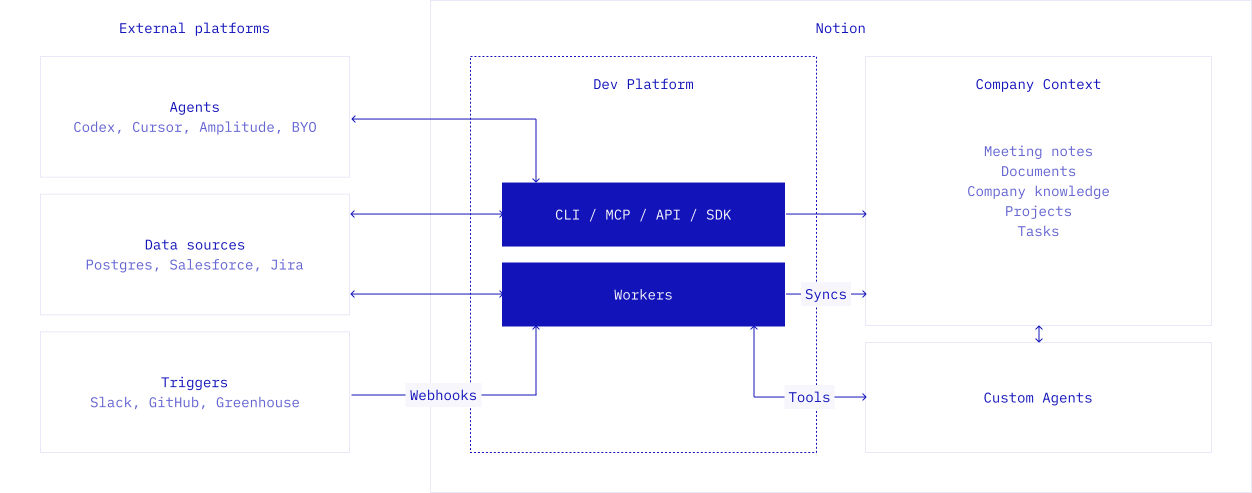
  • A technical architectural diagram illustrates the integration between 'External platforms,' a 'Dev Platform,' and 'Notion' using a blueprint-style aesthetic…
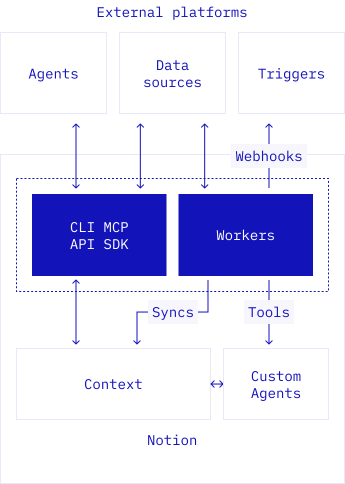
  • A technical blue-and-white architectural diagram illustrates the workflow between 'External platforms' and 'Notion'.
  • A minimalist flat illustration featuring a stylized character in a yellow hardhat peering over the top right corner of a spreadsheet window.
  • A clean screenshot of a project management interface titled 'Issue Tracking' within a web browser window.
  • A clean screenshot of a project management software's timeline view titled "Product roadmap" with a blue car emoji.
  • A digital dashboard interface titled "Project tracker" features a blue book icon and clean sans-serif typography on a white background.
  • A close-up software interface screenshot shows a 'Shown in card' and 'Hidden in card' settings menu overlaying a workspace page titled 'Core Prod'.
  • A software interface screenshot titled "Status automations" displays a white modal with rounded corners.
  • A clean screenshot of a project management software titled Tasks, shown in a Kanban board layout with columns for Not Started, In Progress, and Complete.
  • A UI mockup of a submission form is shown alongside a blurred list of categorized team tags.
  • A clean, white digital interface card titled 'Launch plan' featuring a blue sailboat icon at the top left.
  • A clean user interface modal for software permissions displays options to 'Select person property' with 'Reporter' currently checked and highlighted in light…
  • A clean, white screenshot of a digital document titled 'Proposal: Project Atlas.' An AI input field sits in the center with the prompt 'Write a project…
  • A close-up screenshot of a project management table under the header 'Project: User education.' A white hand cursor hovers over a magic wand icon for the…
  • A screenshot of a software project management 'Sprint board' interface, featuring a clean, minimalist white layout with black and blue accents.
  • A UI screenshot displays a product requirements document in a project management workspace.
  • A screenshot of a software interface titled 'Icon System' featuring a grid of ten minimalist white line icons on a dark rectangular background.
  • A UI mockup screenshot depicts a project page titled 'App Rebrand' with a sub-header labeled 'Context'.
  • A software interface screenshot displays a project management table titled 'Engineering Tasks' in bold black text.
  • A close-up software screenshot displays a 'Daily Report' dashboard within a clean, white browser-like interface.
  • A clean software interface graphic titled 'Pre-launch engineering tasks' displays two columns of task cards under 'Active Issues' and 'Upcoming Issues'.
  • A minimalist, hand-drawn graphic illustration of three stacked architectural blueprints.
  • A digital graphic featuring a trio of G2 award badges for Summer 2025 arranged in a staggered horizontal row.
  • A clean software interface screenshot showcases a grid of fifteen integration tiles for apps like Asana, Confluence, Google Docs, and Trello.
  • A clean software interface screenshot shows a Kanban board titled "Branch's engineering roadmap" with a red car emoji.
  • A minimalist software screenshot displays a 'Daily standup' dashboard with a red 'VOL.
  • A screenshot of an 'Editorial calendar' interface within the Notion application, featuring a prominent black cube logo with a white letter 'N'.
  • A clean screenshot of a company wiki for 'Acme Inc.' within a workspace software application.
  • A screenshot of a Notion-style productivity page titled "Team weekly" with a red soccer goal icon at the top.
  • A bold blue painter's palette acts as a base for several 3D geometric shapes, including a cube, a rectangle, a circle, a triangle, and a pentagon.
  • A minimalist black and white line drawing of a clipboard with a checklist.
  • A minimalist black line art logo featuring a circular frame containing a stylized human face in profile.
  • A minimalist black ink illustration of three small circles arranged in an inverted triangle shape on an off-white background.
  • A minimalist black and white line drawing depicts three small cubes popping out of an open cardboard box on thin, curved lines.
  • A minimalist black line icon depicting two hands meeting in a handshake, centered on a solid off-white background.
  • A minimalist black ink line drawing features a thick stack of papers or documents bound together by a vertical string and a simple bow at the top.
  • A minimalist black ink illustration features two interlocking gears of different sizes, positioned in the lower right.
  • A thick, black-ink hand-drawn illustration of a pencil angled diagonally from the top-right towards the bottom-left.
  • A minimalist, hand-drawn line illustration of a circular face wearing a headset.
  • A digital UI layout features two overlapping browser windows on a solid light blue background.
  • A minimalist, hand-drawn character face is contained within a bold black circle.
  • A split-screen software screenshot overlays a vibrant coral textured background.
  • Three whimsical hand-drawn circular icons are arranged in a horizontal row against a white background.
  • A clean software interface screenshot shows a Kanban-style task board organized into columns: To-do, In progress, In review, and Complete.
  • A minimalist black-and-white line drawing features two character heads beside a teal circular icon containing a white apple with eyes.
  • A split-screen software dashboard screenshot displays enterprise management tools against a textured teal background.
  • A software interface screenshot displays a 'Bug Tracking Dashboard' page next to an AI chatbot overlay.
  • A screenshot of a Notion AI profile page titled "Sidekick" features a minimalist black-and-white UI with a friendly, hand-drawn mascot wearing a propeller…
  • A circular array of twelve distinct application icons orbits a large central white circle containing a minimalist, black-line drawn face.
  • A clean software screenshot of the Notion AI dashboard showing credit usage and agent performance.
  • Five security and compliance shield icons are arranged in two rows, three on top and two on the bottom.
  • A horizontal graphic element featuring a soft, linear gradient that transitions from solid white at the bottom to total invisibility at the top.
  • A horizontal pill-shaped graphic displays a recording interface for a 'Technical Design Review'.
  • A digital graphic of a white search bar or message input field with rounded corners.

Imagery and illustration

23 images

Notion’s marketing imagery combines product-led compositions with approachable illustrations and occasional editorial photography. Keep imagery simple, legible, and purposeful; use it to make a workflow, idea, or human benefit easier to understand.

  • The bold text "Where teams and agents Think together" sits above a row of circular avatars on a clean white background.
  • A graphic for Notion features the bold headline 'Where teams and agents Think together.' against a clean white background, with 'Think' highlighted in a…
  • A minimalist hand-drawn illustration of a woman's face with short black bobbed hair, enclosed within a vibrant blue circular border.
  • A minimalist graphic divided into white and pale yellow halves.
  • A retro-style black and white line art illustration depicts three stylized flowers sprouting from an open box.
  • A stylized graphic of a padlock where the body is a bright blue browser window featuring a black keyhole and two white four-pointed stars.
  • A thick-lined, hand-drawn illustration of a shield shown from a three-quarter perspective.
  • A minimalist, hand-drawn lighthouse illustration features bold black outlines and a vibrant blue and white diagonal striped tower.
  • A minimalist, hand-drawn illustration featuring a stack of four thick books in bright blue and white.
  • A whimsical illustration of a bouquet where blue mechanical gears bloom like flower heads on black-outlined stems with small leaves.
  • A minimalist, hand-drawn illustration features a long-nosed dog with shaggy ears and a wagging tail, rendered in thick black outlines.
  • A stylized graphic illustration of a construction crane rendered in a bold, hand-drawn comic style with thick black outlines and vibrant blue accents.
  • A black-and-white minimalist line drawing features three separate stylized characters sitting at desks with laptops.
  • A minimalist black and white line-art illustration shows a man walking away from a black office chair with a casual, content expression.
  • A complex collage features a sepia-toned vintage photo of a crowded historical factory floor, overlaid with black silhouette profile heads and floating…
  • A grainy black-and-white photograph of a 1950s 'Remington Rand' mainframe computer room serves as the backdrop for a modern line-art illustration.
  • A minimalist black and white vector illustration features a large solid black silhouette of a human head surrounded by a halo of nine square icons and…
  • A minimalist black and white line-drawing of a man with voluminous dark hair positioned on the far right.
  • A black-and-white infographic contrasts vintage tools with modern digital concepts, centered around a confused cartoon man shrugging.
  • A whimsical black-and-white line illustration depicts two stylized characters managing a stream of digital content icons.
  • A black-and-white minimalist line drawing features three stylized male office workers sitting at desks with laptops, each waving one hand.
  • A black-and-white vector illustration features a woman with shoulder-length dark hair sitting in a large beanbag chair while working on a laptop.
  • A minimalist black-and-white line illustration depicts three colleagues working on laptops around a table, surrounded by floating colorful icons representing…

More from the Brand Skill

Positioning and messaging

Present Notion as a connected workspace where teams capture knowledge, find answers, and move work forward. The core story connects shared context with practical work: keep information organized, bring connected tools together, and use AI or agents to act on that context.

For product and enterprise messaging, emphasize flexible workflows, everyday usability, collaboration, and the ability to adapt the workspace to each team. Describe AI as integrated into the work itself, rather than as a detached, generic tool.

Use customer stories and performance figures only when the specific claim, customer, and context are clear. Keep customer logos, quotations, and outcomes attributed to the correct organization and speaker.

Product and security claims

Be precise about plan availability and data handling. Distinguish the personal Notion Agent from team-wide Custom Agents, which are available on Business and Enterprise plans. State feature availability and usage limits only when they are confirmed for the relevant plan or release.

Describe Notion’s AI data practice as no training on customer data by default. Mention opt-in sharing when it is material to the claim. Enterprise zero data retention applies to the stated Enterprise context; do not imply the same retention terms for every plan.

When discussing security, privacy, certifications, compliance, or data residency, use the exact scope and qualification attached to the claim. Avoid presenting a specific plan’s control or a regional option as universal.

Download Notion’s Brand Skill

A Brand Skill is a folder of brand guidance written for agents. Give it to Claude, ChatGPT, Cursor or another agent and ask it to follow Notion’s guidelines. It starts at SKILL.md, which points to the right file for each task.

It has the guidance, 143 images and the logos. The font files belong to Notion Labs, Inc, so they’re left out.

notion-brand-skill/

├ SKILL.md

├ README.md

├ references/

│ ├ dos-and-donts.md

│ ├ colors.md

│ ├ logo.md

│ ├ product-experience.md

│ ├ typography.md

│ ├ imagery-and-illustration.md

│ ├ positioning-and-messaging.md

│ ├ voice-and-copy.md

│ └ product-and-security-claims.md

└ assets/

├ images/

└ logos/

Rainbrand’s Brand Agent built this Brand Skill from notion.com on 30 Oct 2026. It isn’t Notion’s official guide. Reviewed by Siddharth Borderwala, Founding Engineer at Rainbrand.

Notion and its logos are trademarks of Notion Labs, Inc. Rainbrand isn’t affiliated with or endorsed by Notion Labs, Inc.
Make one for
your brand.

Add Rainbrand to your agent and give it your website, brand guide or files. Rainbrand builds a Brand Skill like this one and keeps it up to date.

  1. Open the Rainbrand plugin and add it.

    Open Rainbrand plugin (opens in a new tab)
  2. Connect your Rainbrand account when asked. It works in ChatGPT and in Codex.

See all brands